
I recently put together a small website, ipmutton.com. It does one thing: it shows you the connection the rest of the internet actually sees — your IPv4 and IPv6 address, approximate location, ISP / ASN, reverse DNS, the TLS/HTTP details of your request, and a live round-trip time to the server. That’s it. No login, no tracking, no clutter.
Why build another “what’s my IP” site?
There are already dozens of these pages. So why bother? Because nearly all of them share the same problems:
- They’re plastered with ads. The actual answer — your IP address — is a small island in an ocean of banner ads, “sponsored” boxes, autoplaying video, and newsletter pop-ups. Many of them quietly load trackers from a dozen third-party domains while they’re at it.
- They’re not pretty. Cramped layouts, mystery-meat navigation, walls of SEO filler text explaining “what is an IP address” before they’ll tell you yours.
- They’re not easy to use. If you just want to copy your address into a firewall rule or a support ticket, you shouldn’t have to hunt for it, dismiss three overlays, and decline a cookie banner first.
I wanted something I’d actually enjoy opening: it loads instantly, shows both address families side by side, and makes zero third-party requests — a strict Content-Security-Policy on the page makes that promise enforceable, not just a claim. The world map, the share image, everything is self-contained.
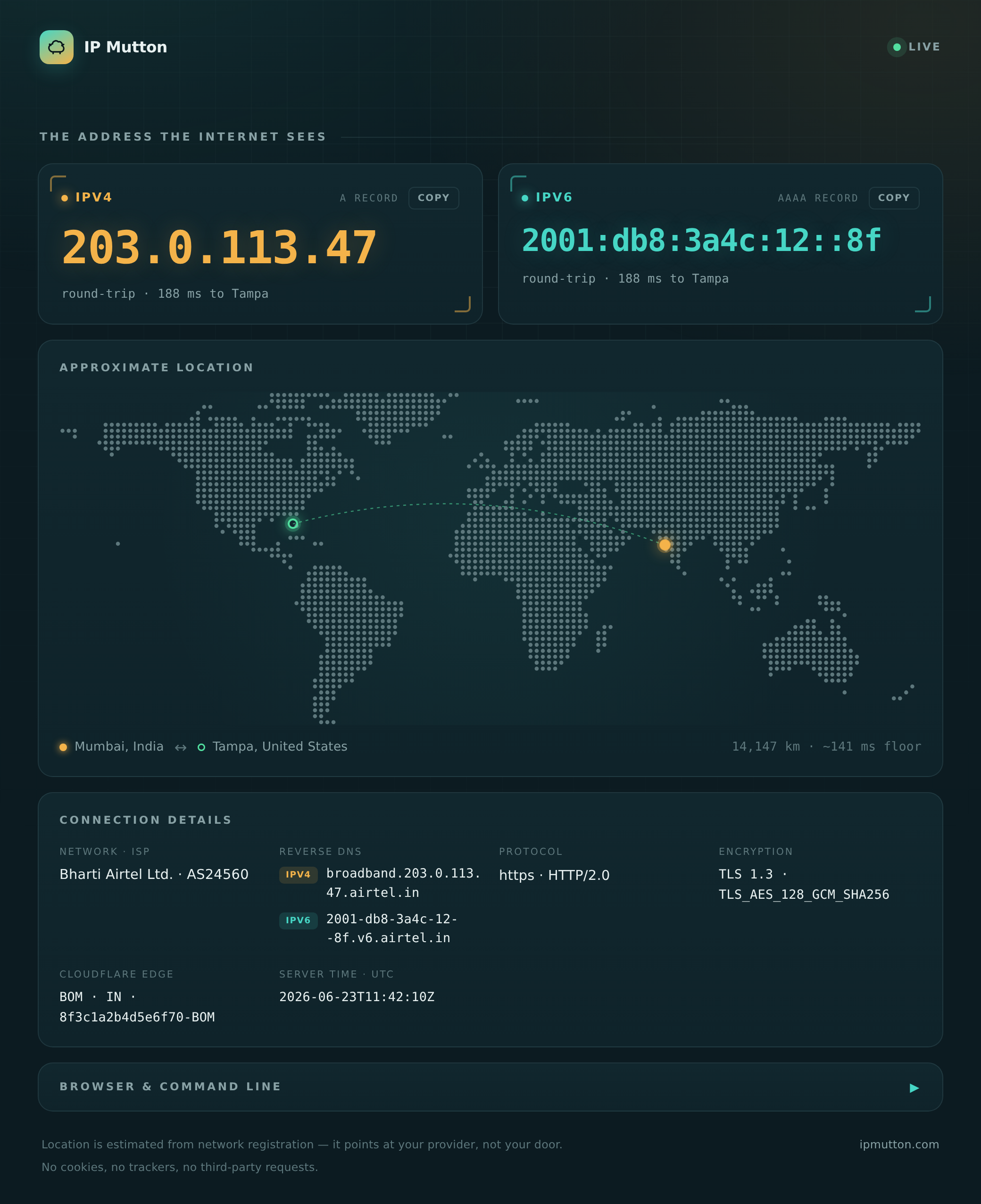
A few things that fell out of that goal:
- Real dual-stack. A single TCP connection is either IPv4 or IPv6, never
both — so a normal page can only ever show you one. IP Mutton publishes two
extra probe hostnames (
v4.ipmutton.com,v6.ipmutton.com) that are forced onto each family, fetches both, and shows you each address (or tells you honestly that you don’t have one). - A genuine round-trip number. The probe hosts hit the origin server directly (no CDN in the path), so the latency you see is really you ↔ the server, pinned on a map with the great-circle distance.
- Tiny and private. It’s a single ~12 MB Go service. Geolocation is a local, memory-mapped database, so your address isn’t shipped off to some third-party geo-IP API to look it up.
Built in a day, in a language I’d never written
Here’s the part I still find a little surprising: the whole thing — the Go service, the dual-stack probe trick, the nginx and Cloudflare Tunnel setup, the self-contained web page with its hand-drawn world map, even the share image generator — was built in a single day, using Claude. And it’s written entirely in Go, a language I had no prior experience with.
I came in knowing what I wanted the finished product to feel like, and worked through the design and the code conversationally — asking questions, reviewing what came back, and iterating. The result is something I’d have happily shipped in a language I do know, in a fraction of the time I’d have expected. If you’ve been on the fence about building a small, real project with an AI assistant in unfamiliar territory, consider this a data point: it works remarkably well.
The part I’m most happy about: the JSON API
The pretty page is nice for humans, but the reason I reach for IP Mutton myself
is the clean JSON API. The same endpoint serves a browser an HTML page, but
hand it ?format=json (or hit /api) and you get a tidy, predictable snapshot
— perfect for scripts, monitoring, and CI.
curl 'https://ipmutton.com/?format=json'
# or the alias:
curl 'https://ipmutton.com/api'
The output is a single flat-ish object with sensible keys and real types
(numbers are numbers, missing values are null — not the empty strings or
stringified numbers you often get elsewhere):
{
  "ipv4": "203.0.113.10",
  "ipv6": "2001:db8:42::1",
  "address_family": "IPv4",
  "reverse_dns": "cpe-203-0-113-10.example.net",
  "geolocation": {
    "city": "Austin",
    "region": "Texas",
    "country": "United States",
    "country_code": "US",
    "postal_code": "78701",
    "time_zone": "America/Chicago",
    "latitude": 30.27,
    "longitude": -97.74
  },
  "isp": {
    "name": "Example Broadband",
    "asn": 64500,
    "network": "203.0.113.0/24"
  },
  "server": {
    "location": "Tampa, Florida, United States",
    "latitude": 28.01,
    "longitude": -82.49
  },
  "http_version": "HTTP/2.0",
  "scheme": "https",
  "tls_version": "TLS 1.3",
  "tls_cipher": "TLS_AES_128_GCM_SHA256",
  "server_time_utc": "2026-06-23T11:26:54Z",
  "cloudflare": { "ray_id": "a10323…-MIA", "colo": "MIA", "country": "US" },
  "browser": { "language": "en-US", "platform": "macOS" },
  "user_agent": "Mozilla/5.0 …"
}
Because each probe host is locked to one address family, you can ask for exactly
the one you want — and the unused family comes back null:
curl 'https://v4.ipmutton.com/?format=json'   # IPv4-only view
curl 'https://v6.ipmutton.com/?format=json'   # IPv6-only view
That makes the common one-liners trivial. Want just your public IPv4 for a
script? Pipe it through jq:
# Your public IPv4, nothing else
curl -s 'https://v4.ipmutton.com/?format=json' | jq -r .ipv4
# 203.0.113.10

# Your ISP and ASN
curl -s 'https://ipmutton.com/api' | jq -r '.isp | "\(.name) (AS\(.asn))"'
# Example Broadband (AS64500)

# Are you reaching the internet over IPv6 right now?
curl -s 'https://ipmutton.com/api' | jq -r .address_family
# IPv4
And if you don’t even want JSON — just running curl against the site (with no
flags) gives you a clean Unicode table, because the server notices the curl/
user-agent and formats accordingly:
┌───────────────┬─────────────────────────────────┐
│ FIELD         │ VALUE                           │
├───────────────┼─────────────────────────────────┤
│ IPv4          │ 203.0.113.10                    │
│ IPv6          │ 2001:db8:42::1                  │
│ Connected via │ IPv4                            │
│ Network CIDR  │ 203.0.113.0/24                  │
│ Reverse DNS   │ cpe-203-0-113-10.example.net    │
│ Location      │ Austin, Texas, United States    │
│ Server        │ Tampa, Florida, United States   │
│ ISP / Network │ Example Broadband (AS64500)     │
│ HTTP          │ https                           │
│ TLS           │ TLS 1.3                         │
│ Cloudflare    │ MIA · US · a10323…-MIA          │
│ Server Time   │ 2026-06-23T11:26:54Z            │
│ User Agent    │ curl/8.14.1                     │
└───────────────┴─────────────────────────────────┘
One URL, three audiences: a polished page for people, a clean table for the terminal, and structured JSON for machines — and not a single ad in sight.
Try it
Point a browser at ipmutton.com, or from a terminal:
curl ipmutton.com                       # the table
curl 'ipmutton.com/?format=json' | jq   # the JSON